|
 |
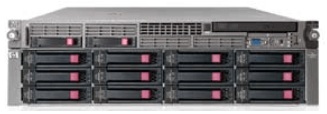
 一、HP VLS6000 存储的维修服务成功案例。 一、HP VLS6000 存储的维修服务成功案例。  |
 |
|
案例一、永丰产业基地某公司的HP VLS6000 虚拟带库维修服务;上电后,无法在操作系统中识别到磁盘阵列,经过我工程师的技术服务,恢复正常,维修成功。 |
|
错误现象:上电后无法在操作系统中识别到磁盘阵列。 |
|
解决的方法:工程师通过技术处理。 |
|
结论:机器能够正常的启动机器,维修成功。 |
|
|
|
|
|
|
|
|
|
|
|
案例二、北京市某电力公司的HP VLS6000 虚拟带库 ,上电后,硬盘亮黄灯,经过我工程师的技术服务,恢复正常,维修成功。 |
|
错误现象:硬盘亮黄灯 |
|
解决的方法:更换备件。 |
|
结论:维修成功。 |
|
|
|
|
|
|
|
|
|
|
|
案例三、北京市某公司的HP VLS6000 存储维修服务,RAID5中的硬盘坏了,经过我工程师的技术服务,恢复正常,维修成功。 |
|
错误现象: LEFTOVR SATA 1000 3.0 Warning。 |
|
解决的方法:更换备件 |
|
结论:机器能够正常的启动机器,维修成功。 |
|
|
|
|
|
|
案例四、北京市某企业HP VLS6000 存储维修服务,控制器电池坏了,经过我工程师的技术服务,恢复正常,维修成功。 |
|
错误现象:控制器坏了 |
|
解决的方法:更换备件。 |
|
结论:机器能够正常的启动机器,维修成功。 |
|
|
|
|
|
|
案例五、某系统集成有限公司的HP VLS6000虚拟带库 |
|
错误现象:Web is not open(无法打开web管理界面) |
|
解决的方法:更换备件。 |
|
结论:机器能够正常的启动机器,维修成功。 |
|
|
|
|
|
|
案例六、某系统集成有限公司的HP VLS6000虚拟带库 |
|
错误现象:vd9 8800.8GB 131.0KB A RAID6 12 1 64 CRIT |
|
解决的方法:更换备件。 |
|
结论:机器能够正常的启动机器,维修成功。 |
|
|
|
|
|
|
案例七、某系统集成有限公司的HP VLS6000虚拟带库 |
|
错误现象: vd5 is VDISK SP(状态) SATA 1000 3.0 |
|
解决的方法:更换备件。 |
|
结论:机器能够正常的启动机器,维修成功。 |
|
|
|
|
|
|
案例八、某电信公司的HP VLS6000虚拟带库 |
|
错误现象: HP MSA Storage Management Utility, Right click on the affected vdisk and select Configuration > Manage Dedicated Spares |
|
解决的方法:更换备件。 |
|
结论:机器能够正常的启动机器,维修成功。 |
|
|
|
|
|
|
案例九、某电信公司的HP VLS6000虚拟带库 |
|
错误现象: Your disk should appear in the list of available drives with a state of AVAIL. Tick the drive, then click the Modify Spares button. |
|
解决的方法:更换备件。 |
|
结论:机器能够正常的启动机器,维修成功。 |
|
|
|
|
|
|
案例九、某电信公司的HP VLS6000虚拟带库 |
|
错误现象: The disk will be re-joined to the array. Initially it may be listed as a spare, but the MSA will automatically re-join the disk as an active member of the RAID if this is how it was originally configured.. |
|
解决的方法:更换备件。 |
|
结论:机器能够正常的启动机器,维修成功。 |
|
|
|
|
|
|
案例十、某研究所的HP VLS6000虚拟带库 |
|
错误现象: The array will begin the Reconstruction process automatically. This can take a very long time depending on the size of your drives. |
|
解决的方法:更换备件。 |
|
结论:机器能够正常的启动机器,维修成功。 |
|
|
|
|
|
|
案例十一、某数据公司的HP VLS6000虚拟带库 |
|
错误现象: In this situation, original SPARE has now become AVAIL. So, re-add this AVAIL disk as SPARE using above steps. After setting this as spare – this disk will now show a status of: VDISKSP or SPARE . |
|
解决的方法:更换备件。 |
|
结论:机器能够正常的启动机器,维修成功。 |
|
|
|
|
|
| 现在坏了三块盘 其中一块FAILED 两块LEFTOVR.Mr Huo,Tel:13301272832 |
| 右键点击vd06,选择Tools -> Dequarantine Vdisk.Mr Huo,Tel:13301272832 |
| 报错 Error: Command failed. (vd01) - Vdisk is not online or fault tolerant. Cannot be trusted..Mr Huo,Tel:13301272832 |
| 46 4QJ35KZZ ATA A3EA VDISK SP SATA 1000 3.0 Up.Mr Huo,Tel:13301272832 |
| 47 5Q835KZJ ATA HPG2 LEFTOVR SATA 1000 3.0.Mr Huo,Tel:13301272832 |
| P2000 G3 MSA System SMU Reference Guide.Mr Huo,Tel:13301272832 |
| P2000 G3 MSA System CLI Reference Guide.Mr Huo,Tel:13301272832 |
| WED SEP 11 17:28:47 2018 [37] #A25441: VLS Capacity Mod Array SN#00C0FFDAE445 Controller A INFORMATIONAL: Vdisk reconstruct started (Vdisk: vd5, SN: 0xc0ffdaeeb9000018bcc65400000888) drive: Channel:0 ID:47 SN:ZBS13VYH Encl:4 Slot :5. Mr huo,Tel:13301272832 |
| WED SEP 11 17:28:52 2018 [18] #A25442: VLS Capacity Mod Array SN#00C0FFDAE445 Controller A WARNING: Vdisk reconstruct failed. Command failed (error code 1). (Vdisk: vd5, SN: 0xc0ffdaeeb9000018bcc65400000888). Mr huo,Tel:13301272832 |
| WED SEP 11 17:32:22 2018 [18] #A25456: VLS Capacity Mod Array SN#00C0FFDAE445 Controller A WARNING: Vdisk reconstruct failed. Command failed (error code 1). (Vdisk: vd5, SN: 0xc0ffdaeeb9000018bcc65400000888). Mr huo,Tel:13301272832 |
| Available — Disk is available for use in a virtual disk. Mr huo,Tel:13301272832 |
| Clearing the Leftover Disks. Mr huo,Tel:13301272832 |
| Global spare — Disk is available as a global spare. Mr huo,Tel:13301272832 |
| Leftover — Disk contains metadata but is not part of a virtual disk. Mr huo,Tel:13301272832 |
| Spare assigned to virtual disk — Disk is a spare assigned to a virtual disk. Mr huo,Tel:13301272832 |
| Configuring the Storage Pool Policy. Mr huo,Tel:13301272832 |
| Managing VLS Capacity. Mr huo,Tel:13301272832 |
| Automigration/Replication. Mr huo,Tel:13301272832 |
| User Interface Requirements. Mr huo,Tel:13301272832 |
| Configuration. Mr huo,Tel:13301272832 |
| Setting the Network Settings. Mr huo,Tel:13301272832 |
| Powering On VLS Arrays. Mr huo,Tel:13301272832 |
| Management. Mr huo,Tel:13301272832 |
| 1 Online spare memory LED Green = Protection enabled. Mr huo,Tel:13301272832 |
| Flashing amber = Memory configuration error. Mr huo,Tel:13301272832 |
| Amber = Memory failure occurred. Mr huo,Tel:13301272832 |
| Off = No protection. Mr huo,Tel:13301272832 |
| 2 Mirrored memory LED Green = Protection enabled. Mr huo,Tel:13301272832 |
| Flashing amber = Memory configuration error. Mr huo,Tel:13301272832 |
| Amber = Memory failure occurred. Mr huo,Tel:13301272832 |
| Off = No protection. Mr huo,Tel:13301272832 |
| All other LEDs Amber = Failure. Mr huo,Tel:13301272832 |
| Off = Normal. For additional information detailing. Mr huo,Tel:13301272832 |
| the causes for the activation of these LEDs, refer to. Mr huo,Tel:13301272832 |
| HP Systems Insight Display LEDs and Internal Health. Mr huo,Tel:13301272832 |
| LED Combinations.. Mr huo,Tel:13301272832 |
| 1 Hard drive 1. Mr huo,Tel:13301272832 |
| 2 Hard drive 2. Mr huo,Tel:13301272832 |
| 3 DVD-ROM drive. Mr huo,Tel:13301272832 |
| 4 Hard drive blank. Mr huo,Tel:13301272832 |
| 5 Hard drive blank. Mr huo,Tel:13301272832 |
| 6 Video connector. Mr huo,Tel:13301272832 |
| 7 HP Systems Insight Display. Mr huo,Tel:13301272832 |
| 8 Front USB connector. Mr huo,Tel:13301272832 |
| Recovering from Operating System Failure. Mr huo,Tel:13301272832 |
| Manually Restoring the System. Mr huo,Tel:13301272832 |
| After re-installing the operating system, the warm failover feature restores the licenses and. Mr huo,Tel:13301272832 |
| configuration settings. However, if the warm failover does not occur (for example, due to a corrupt. Mr huo,Tel:13301272832 |
| or missing file), the VLS virtual library configuration and network settings can be quickly restored. Mr huo,Tel:13301272832 |
| from the configuration file created by performing a Save Configuration. See Restoring the. Mr huo,Tel:13301272832 |
| Configuration from a Configuration File.. Mr huo,Tel:13301272832 |
| If a configuration file was not created, you must reconfigure the network settings and rebuild the. Mr huo,Tel:13301272832 |
| virtual library and virtual drive configurations. The cartridge configurations, however, do not have. Mr huo,Tel:13301272832 |
| to be rebuilt, as they are stored on the disk arrays. See Manually Rebuilding the Virtual Library. Mr huo,Tel:13301272832 |
| Configuration.. Mr huo,Tel:13301272832 |
| In either case, begin by re-installing the licenses.. Mr huo,Tel:13301272832 |
| Recovering from a VLS Disk Array RAID Volume Failure. Mr huo,Tel:13301272832 |
| If three or more hard drives have failed in a single VLS9000 disk array enclosure, a disk array. Mr huo,Tel:13301272832 |
| RAID volume failure has occurred. Each disk array enclosure is configured as one RAID6 volume.. Mr huo,Tel:13301272832 |
| A disk array enclosure RAID volume failure will corrupt all the data stored on the VLS storage pool. Mr huo,Tel:13301272832 |
| using that RAID volume, making it unrecoverable.. Mr huo,Tel:13301272832 |
| NOTE: Only perform this procedure if a RAID volume failure has actually occurred. Other factors. Mr huo,Tel:13301272832 |
| can result in a false RAID volume failure being reported, such as a disk array enclosure being. Mr huo,Tel:13301272832 |
| powered down or the disk array enclosure external cabling being disconnected at either end.. Mr huo,Tel:13301272832 |
| To recover from a disk array enclosure RAID volume failure:. Mr huo,Tel:13301272832 |
| 1. Repair the failed RAID volume (for example, replace the failed hard drives in the RAID volume).. Mr huo,Tel:13301272832 |
| See Hard Drive.. Mr huo,Tel:13301272832 |
| 2. Erase all the virtual media from the disk array enclosures and rebuild all the RAID volumes on. Mr huo,Tel:13301272832 |
| the storage pool affected:. Mr huo,Tel:13301272832 |
| a. Select Storage Pools in the navigation tree, then select the storage pool that needs recovery.. Mr huo,Tel:13301272832 |
| b. Click Rebuild Storage Pool in the task bar.. Mr huo,Tel:13301272832 |
| c. Click Rebuild.. Mr huo,Tel:13301272832 |
| d. Click Yes to confirm.. Mr huo,Tel:13301272832 |
| 3. Recreate the cartridges that existed on the VLS storage pool.. Mr huo,Tel:13301272832 |
| VLS cartridge configurations are stored on the disk arrays and have been erased.. Mr huo,Tel:13301272832 |
| . Mr huo,Tel:13301272832 |
| . Mr huo,Tel:13301272832 |
| Monitoring. Mr huo,Tel:13301272832 |
| Status Information in the Status Pane. Mr huo,Tel:13301272832 |
| View VLS on the status pane when an individual hardware component or virtual device is selected. Mr huo,Tel:13301272832 |
| in the navigation tree.. Mr huo,Tel:13301272832 |
| The device status possibilities are:. Mr huo,Tel:13301272832 |
| Good— The component, part of the component, or the virtual device is operating normally.. Mr huo,Tel:13301272832 |
| Degraded—The component, or one or more parts of the component, has failed or is operating. Mr huo,Tel:13301272832 |
| outside of its normal range but is still operational.. Mr huo,Tel:13301272832 |
| Critical —The component, or one or more parts of the component, has failed or exceeded its. Mr huo,Tel:13301272832 |
| limits. Although it is still operational, VLS failure is imminent.. Mr huo,Tel:13301272832 |
| Failed—The component, or one or more parts of the component, has failed and the VLS is. Mr huo,Tel:13301272832 |
| inoperable. Immediate service is needed.. Mr huo,Tel:13301272832 |
| Missing —The VLS cannot detect the component or a part of the component.. Mr huo,Tel:13301272832 |
| In addition to the device status, a red or yellow alert bar will highlight specific parts of a component. Mr huo,Tel:13301272832 |
| when that particular element within the component has failed (red) or is operating outside its normal. Mr huo,Tel:13301272832 |
| range (yellow).. Mr huo,Tel:13301272832 |
| To view the status information for a VLS hardware component or virtual device, from Command. Mr huo,Tel:13301272832 |
| View VLS:. Mr huo,Tel:13301272832 |
| 1. Click the System tab.. Mr huo,Tel:13301272832 |
| 2. Click the object in the navigation tree that represents the hardware component or virtual device. Mr huo,Tel:13301272832 |
| that you want to view.. Mr huo,Tel:13301272832 |
| The status information for the object selected, and its subobjects in the navigation tree, is. Mr huo,Tel:13301272832 |
| displayed in the status pane.. Mr huo,Tel:13301272832 |
| Status Icons. Mr huo,Tel:13301272832 |
| Device Status Icon. Mr huo,Tel:13301272832 |
| A device status icon can be one of four states:. Mr huo,Tel:13301272832 |
| Unknown—A component's operating condition is unknown. Contact HP Technical Support.. Mr huo,Tel:13301272832 |
| Normal—All components within the VLS are operating normally.. Mr huo,Tel:13301272832 |
| Warning—A component's operating condition has degraded.. Mr huo,Tel:13301272832 |
| Error—A component has failed.. Mr huo,Tel:13301272832 |
| Notification Alerts. Mr huo,Tel:13301272832 |
| CLI Command Set. Mr huo,Tel:13301272832 |
| CLI-only Commands. Mr huo,Tel:13301272832 |
| This section describes the CLI-only commands in the VLS CLI command set.. Mr huo,Tel:13301272832 |
| Connection Commands. Mr huo,Tel:13301272832 |
| Use the CLI commands in CLI connection commands to establish or close a VLS secure shell or. Mr huo,Tel:13301272832 |
| serial user interface session.. Mr huo,Tel:13301272832 |
| Management Commands. Mr huo,Tel:13301272832 |
| Use the CLI commands in CLI Management commands to:. Mr huo,Tel:13301272832 |
| Change the account passwords. Mr huo,Tel:13301272832 |
| Manage cartridges. Mr huo,Tel:13301272832 |
| Restart the VLS device emulations. Mr huo,Tel:13301272832 |
| Save configuration settings. Mr huo,Tel:13301272832 |
| Restore configuration settings. Mr huo,Tel:13301272832 |
| Table 28 CLI Management Commands. Mr huo,Tel:13301272832 |
| restartEmulations Restarts the VLS device emulations.. Mr huo,Tel:13301272832 |
| restartCommandViewVLS Restarts Command View VLS.. Mr huo,Tel:13301272832 |
| restartSystem Shuts down and restarts the VLS node.. Mr huo,Tel:13301272832 |
| shutdownSystem Shuts down the VLS node so it can be powered off.. Mr huo,Tel:13301272832 |
| shutdownNode Shuts down the VLS node so it can be powered off.. Mr huo,Tel:13301272832 |
| saveAllConfig Where the options are:. Mr huo,Tel:13301272832 |
| external configuration file.. Mr huo,Tel:13301272832 |
| -h - Displays command usage information (optional). Mr huo,Tel:13301272832 |
| restoreAllConfig Where the options are:. Mr huo,Tel:13301272832 |
| specified external configuration file.. Mr huo,Tel:13301272832 |
| -h - Displays command usage information (optional). Mr huo,Tel:13301272832 |
 |
|
二、HP 存储的维修成功案例如下: |
| HPVLS9000虚拟带库维修服务; 更多的成功案例 |
| HP VLS6000虚拟带库维修服务;服务更多的成功案例 |
| HP VLS6000存虚拟带库维修服务;更多的成功案例 |
|
| 中国·北京 联系方式:
|
|
|