IBM PS700 无法开机
IBM BladeCenter PS700 Types 8406 无法开机
IBM BladeCenter PS700
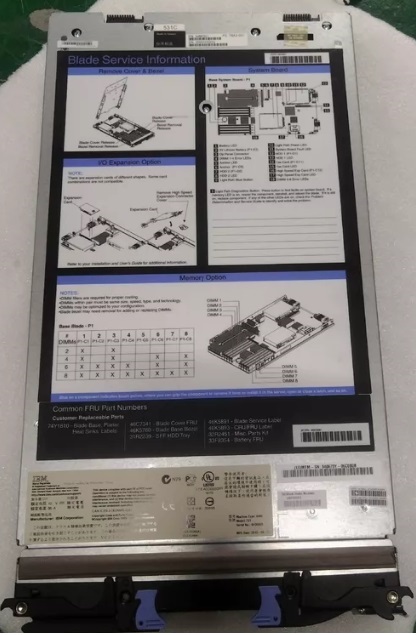
IBM 8406-70Y PS700 刀片 74Y1810 74Y2707 46K5893 44M1501

Blade-error LED 亮黄灯

Blade-error LED 琥珀色指示灯点亮

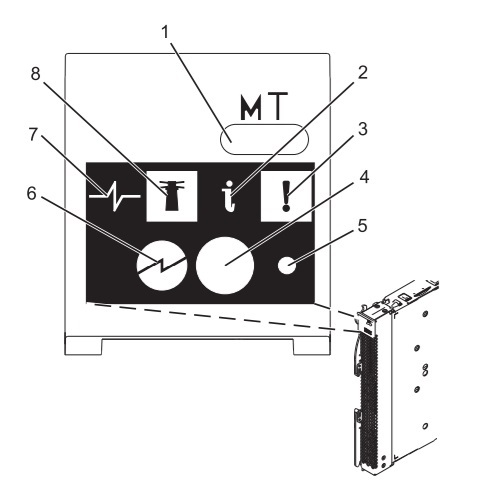
Blade-error LED: When this amber LED is lit, it indicates that a system error has occurred in the
blade server. The blade-error LED will turn off after one of the following events: Correcting the error
Reseating the blade server in the BladeCenter unit Cycling the BladeCenter unit power

▌3▐ 刀片错误指示灯:当此琥珀色指示灯点亮时,表示刀片服务器中发生了系统错误。
在执行以下任一操作后,
刀片错误指示灯将熄灭:纠正错误
在 BladeCenter 单元中重新安装刀片服务器 关闭 BladeCenter 单元电源后再重新开启

System-board LEDs 琥珀色指示灯点亮
Blade server control panel buttons and LEDs 琥珀色指示灯点亮
Blade server control panel buttons ! 琥珀色指示灯点亮

Blade server control panel buttons ! Blade-error LED 琥珀色指示灯点亮

System-board LEDs 亮琥珀色指示灯
Front panel !琥珀色指示灯点亮

DIMM 1 亮琥珀色指示灯

DIMM 1 Un-P1-C1 亮灯
DIMM 2 Un-P1-C2 亮灯
DIMM 3 Un-P1-C3 亮灯
DIMM 4 Un-P1-C4 亮灯
DIMM 5 Un-P1-C5 亮灯
DIMM 6 Un-P1-C6 亮灯
DIMM 7 Un-P1-C7 亮灯
DIMM 8 Un-P1-C8 亮灯

2.5" SAS HDD1 Un-P1-D1 亮灯
2.5" SAS HDD2 Un-P1-D2 亮灯

SAS hard disk drive connector (P1-D2) 亮琥珀色指示灯

IBM PS700 开机无任何显示
IBM PS700 开机无任何相应
IBM PS700 无法上电
IBM PS700 无法启动AIX系统
IBM PS700 指示灯不亮
IBM PS700 !指示灯亮

Error logs:
Index Sev Source Date/Time Text
1 E Blade_05 02/21/2009,
18:16:15
(PS700-xxxxx) SYS F/W: Error. Replace UNKNOWN
(5008FECF B7001111 22222222 33333333 44444444 55555555
66666666 77777777 88888888 99999999)

Blade_01   POSTBIOS:184 The power on password has become invalid
Blade_02   Blade Voltage fault
Blade_04   POSTBIOS:162 Configuration Error

Recovering the system firmware
The system firmware is contained in separate temporary and permanent images in the flash memory of
the blade server. These images are referred to as TEMP and PERM, respectively. The blade server
normally starts from the TEMP image, and uses the PERM image as a backup. If the TEMP image
becomes damaged, such as from a power failure during a firmware update, you can recover the TEMP
image from the PERM image.
If your system hangs, access the management module and select Blade Tasks > Configuration > Boot
Mode to show the PS700 blade server in the list of blade servers in the BladeCenter unit. Click the
appropriate blade server and select Permanent to force the system to start from the PERM image.

错误代码:
B400BAD0
0000XXYY
B400BADD
25C10001
B7000441 Service processor failure. The platform
encountered an error early in the startup
or termination process.
Replace the blade server.
B7000443 Service processor failure. Replace the blade server

B7005402 through
B7005406
A correctable processor failure occurred. Replace the blade server.
BA000081 Failed to get the firmware license policy. 1. Reboot the blade server
Table 36. Parts listing, Type 8406
Index Description
CRU part number FRU part number
Failing function code (FFC) (Tier 1) (Tier 2)

Base system-board and chassis assembly, with 1

IBM PS700 POWER7 four core microprocessor 74Y1810 -->霍工 13301272832(微信同号)

Various, see “Failing function codes 151 through 2E33” on page 181
1 Cover 46C7341
2 4x InfiniBand DDR Expansion Card (CFFh) for
BladeCenter (option) 49Y9976
2 Combo 4Gb Fibre Channel Expansion Card, 1 GB
Ethernet Card, (CFFh/PCIe) (option) 39Y9304
2 QLogic 8 Gb Fibre Channel and 1 Gb Ethernet
expansion card (CFFh/PCIe) (option) 44X1943 2E12
2 QLogic 2 port 10 GB Ethernet FCoE Expansion Card,
(CFFh/PCIe) (option) 42C1832
3 3Gb SAS Passthrough Expansion Card (CIOv) (option) 46C4069 2506
3 QLogic 4Gb Fibre Channel 1Xe PCI-Express Expansion
Card (CIOv) (option) 49Y4237 2E13
3 QLogic 8Gb Fibre Channel 1Xe PCI-Express Expansion
Card (CIOv) (option) 44X1948 2E14
3 Emulex 8Gb Fibre Channel Expansion Card (CIOv)
(option) 46M6138 2607
4 Bezel assembly with control panel 46K5760
4 OEM Bezel assembly with control panel 46K4683
5 DIMM filler 60H2962
6 Memory, 4GB DDR3, 1066MHz VLP RDIMM (option)
77P8691
219
2C6
6Memory, 8GB DDR3, 800MHz VLP RDIMM (option)
77P8692
219
2C6

7 Management card 74Y1978
8 Tray, SAS hard disk drive 31R2239
9 300GB 10K RPM SFF SAS HDD and screws (4) (option) 42D0628
9 600GB 10K RPM SFF SAS HDD and screws(4) (option) 49Y2023
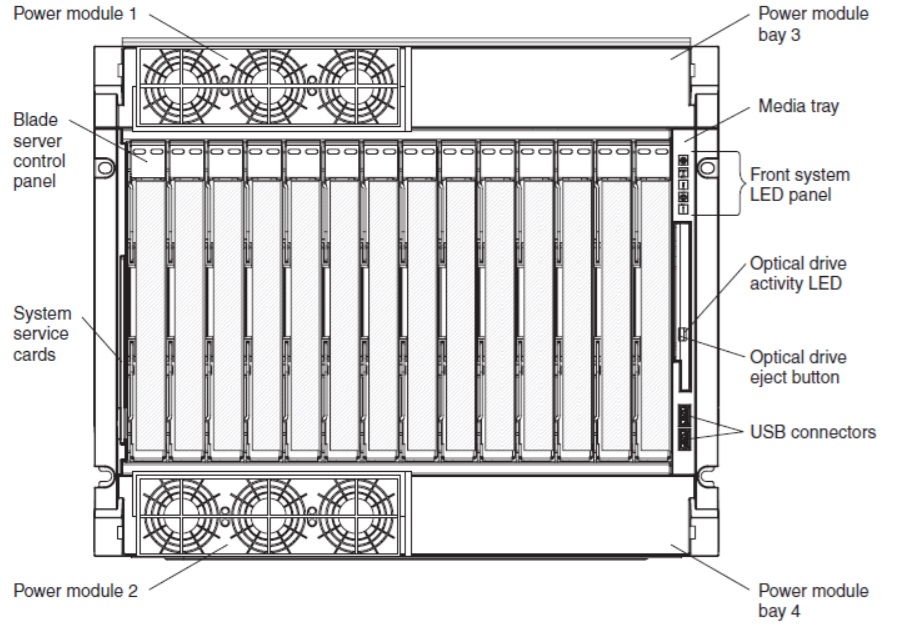
IBM BladeCenter H (8852 and 7989), BladeCenter HT (8740 and 8750), or BladeCenter S (8886 and 7779)技术服务
IBM BladeCenter H 刀箱无法登陆管理GUI
IBM BladeCenter HT 刀箱无法登陆管理GUI
IBM BladeCenter S 刀箱无法登陆管理GUI
IBM BladeCenter 刀箱无法登陆管理GUI
IBM BladeCenter 刀箱电源亮黄灯
IBM BladeCenter 刀箱风扇亮黄灯
IBM PS700 成功案例
某企业的 IBM PS700刀片服务器无法启动技术服务成功
某信息中心 IBM PS700刀片服务器 无法登陆管理界面技术服务成功
某企业信息中心 IBM PS700刀片服务器 无法Power On 技术服务成功
某数据信息中心 IBM PS700刀片服务器 Power 亮黄灯 技术服务成功
某数据信息中心 IBM PS700刀片服务器 Fan 亮黄灯 技术服务成功
某科技公司 IBM PS700 前面板!亮黄灯 技术服务成功
某公司 IBM PS700 前面板!Blade-error LED 亮黄灯 技术服务成功